
What is a coding harness?
- A coding harness is the infrastructure layer that gives a coding agent the environment it needs to work, including a shell, file system, repository access, credentials, compute, and persistent storage.
- Coding harnesses separate the coding agent from the environment it operates in, providing isolation, persistence, access controls, and the resources needed to run coding tasks locally or in the cloud.
- Northflank Cloud Harnesses provide the infrastructure to run coding agents in isolated cloud environments, with support for Claude Code, Codex, Cursor, OpenCode, Pi, or a bring your own agent. Harnesses run on Northflank's managed cloud or in your own AWS, GCP, Azure, Oracle, or CoreWeave account through self-serve BYOC, with microVM isolation, persistent storage, configurable compute and networking, and SSH access.
Run a coding agent in an isolated cloud harness with Northflank Cloud Harnesses, or book a demo to discuss your setup.
A coding harness is the infrastructure layer that connects a coding agent to everything it needs to operate: a shell, a repository, credentials, persistent storage, and an isolated execution environment. Without a coding harness, a coding agent has no place to run code, no file system to read and write, and no way to persist work between sessions.
This article explains what a coding harness is, how it works, what it consists of, and how it differs from adjacent concepts like agent frameworks and sandboxes.
A coding harness is the infrastructure layer that wraps a coding agent and gives it a place to operate. It provides the execution environment the agent works inside, including the operating system, shell, file system, repository, credentials, and network access it needs to complete coding tasks. The agent decides what actions to take and generates the code or instructions, while the harness provides the environment and tools needed to execute them.
The term comes from testing infrastructure, where a test harness provides the scaffolding needed to run tests in a controlled environment. A coding harness applies the same idea to coding agents: it creates a controlled, repeatable environment for an agent to work in, separate from the developer's own machine. Claude Code, Codex, and OpenCode are coding agents, not coding harnesses. The harness provides the environment they operate in, while the agent handles the coding task.
A coding harness provides the execution layer around a coding agent. When a developer gives a coding agent a task, the workflow looks like this:
- Connect to the harness: The developer connects to the harness environment, typically through SSH for a cloud harness or a local process for a local harness.
- Start the coding agent: The agent starts inside the harness with access to the file system, repository, and any configured credentials.
- Request an action: The agent sends the task and relevant context to the model. The model returns an action, such as running a command, editing a file, or reading a log.
- Execute the action: The harness provides the tools and environment needed to execute the action. The shell runs the command, the file system records the edit, and the test runner returns its output.
- Return the result: The result is passed back to the agent as an observation. The agent sends the updated context back to the model and continues the loop.
- Preserve the workspace: When the task is complete, or the developer pauses the environment, the harness can preserve the workspace state so files, installed packages, and Git history remain available.
The harness connects the coding agent to the underlying infrastructure. It controls what the agent can access, provides credentials and tools at runtime, and keeps the workspace available independently of whether the developer is connected.
A coding harness has six core components.
- Isolated execution environment: The workspace where the agent operates. A production coding harness can use a microVM or another isolated environment to prevent the agent from affecting other workloads or the host system. The environment includes the operating system, development tools, and any packages the agent needs to install.
- Shell and file system access: The agent needs a shell to run commands and a file system to read and write files. The harness provides both within the workspace, giving the agent access to the files and directories it needs without exposing the developer's entire machine.
- Repository connection: Most coding agents work against a Git repository. The harness can clone the repository into the workspace and provide the Git credentials needed to pull, commit, and push changes.
- Secrets and credentials injection: Coding agents often need credentials to call model APIs, access Git repositories, or interact with other services. A harness provides a way to securely make these credentials available to the agent at runtime rather than putting them directly in the code.
- Persistent storage: The workspace can persist between sessions. When a harness is paused and resumed, files, installed packages, and Git history can remain available. This means long-running tasks do not require the developer to keep an active session open.
- SSH access: For cloud coding harnesses, SSH gives developers a terminal inside the remote workspace. The coding agent can run there independently of the developer's local machine, allowing the developer to connect, start a task, disconnect, and reconnect later.
Northflank Cloud Harnesses bring these components together in a managed cloud workspace, providing configurable compute, storage, networking, repository access, remote access, and persistent workspace state for coding agents
These three terms are often used together, but they refer to different layers of the same stack.
| Coding harness | Agent framework | Sandbox | |
|---|---|---|---|
| What it is | The environment and infrastructure a coding agent operates in | The building blocks for developing and orchestrating agents | An isolated environment for running code |
| Primary role | Provides the shell, file system, repository, credentials, and workspace the agent uses | Manages model calls, context, tools, and agent workflows | Isolates code execution from the host system |
| Where it sits | Between the agent and the underlying infrastructure | Between the application or task and the agent | Between the code and the underlying system |
| Handles persistence | Yes | Sometimes | Can |
| Handles credentials | Yes | Sometimes | Can |
| Handles repository access | Yes | Can, depending on the implementation | Can |
| Primary concern | Infrastructure, workspace, and isolation | Agent orchestration and workflows | Security and containment |
A coding harness can use a sandbox as its execution layer. The sandbox provides the isolation boundary, while the harness provides everything around it, such as the repository, credentials, persistent storage, and remote access.
An agent framework sits at a different layer. It provides the components used to build and orchestrate an agent, including model calls, tool routing, context management, and task logic. The framework does not necessarily need to know where the agent's code is running.
The boundaries can overlap. Some coding agents, such as Claude Code and Codex, include their own agent loop and tooling, while a cloud coding harness provides the infrastructure those agents run inside.
Without a coding harness, a coding agent typically runs directly on the developer's local machine, with access to the local shell and file system. This gives the agent little separation from the rest of the machine, so an unexpected tool call, prompt injection, or incorrect file path could expose files, credentials, or processes outside the project it is working on.
There is also no built-in shared workspace or managed persistence model. When the local session ends, the agent is tied to that local environment, and another developer cannot simply connect to the same workspace and continue the task. A coding harness adds these missing boundaries by providing an isolated environment, controlled access to credentials and resources, persistent workspace state, and a way for developers to reconnect to and share ongoing work.
A coding harness can run locally or in the cloud, depending on the workload.
- Local: A local coding harness runs on the developer's own machine. The agent has access to the local shell and file system, with additional isolation possible through containers or other runtime controls. Local harnesses work well for development and testing where the developer is actively supervising the agent.
- Cloud. A cloud coding harness runs in a remote environment, typically using an isolated VM or microVM on managed infrastructure or inside the developer's own cloud account. For example, Northflank Cloud Harnesses provide isolated cloud workspaces with configurable compute, storage, networking, and persistent state. Harnesses can run on Northflank's managed cloud or inside your own AWS, GCP, Azure, Oracle, or CoreWeave infrastructure through BYOC.
For teams with compliance or data residency requirements, a BYOC deployment can run the harness inside their own cloud account, keeping the workspace and its resources within their infrastructure.
Northflank Cloud Harnesses provide the infrastructure for running coding agents in isolated cloud environments, with support for Claude Code, Codex, Cursor, OpenCode, Pi, or bring your own agent. Each Harness provides the compute, storage, networking, development tools, credentials, and persistent workspace state a coding agent needs to work.
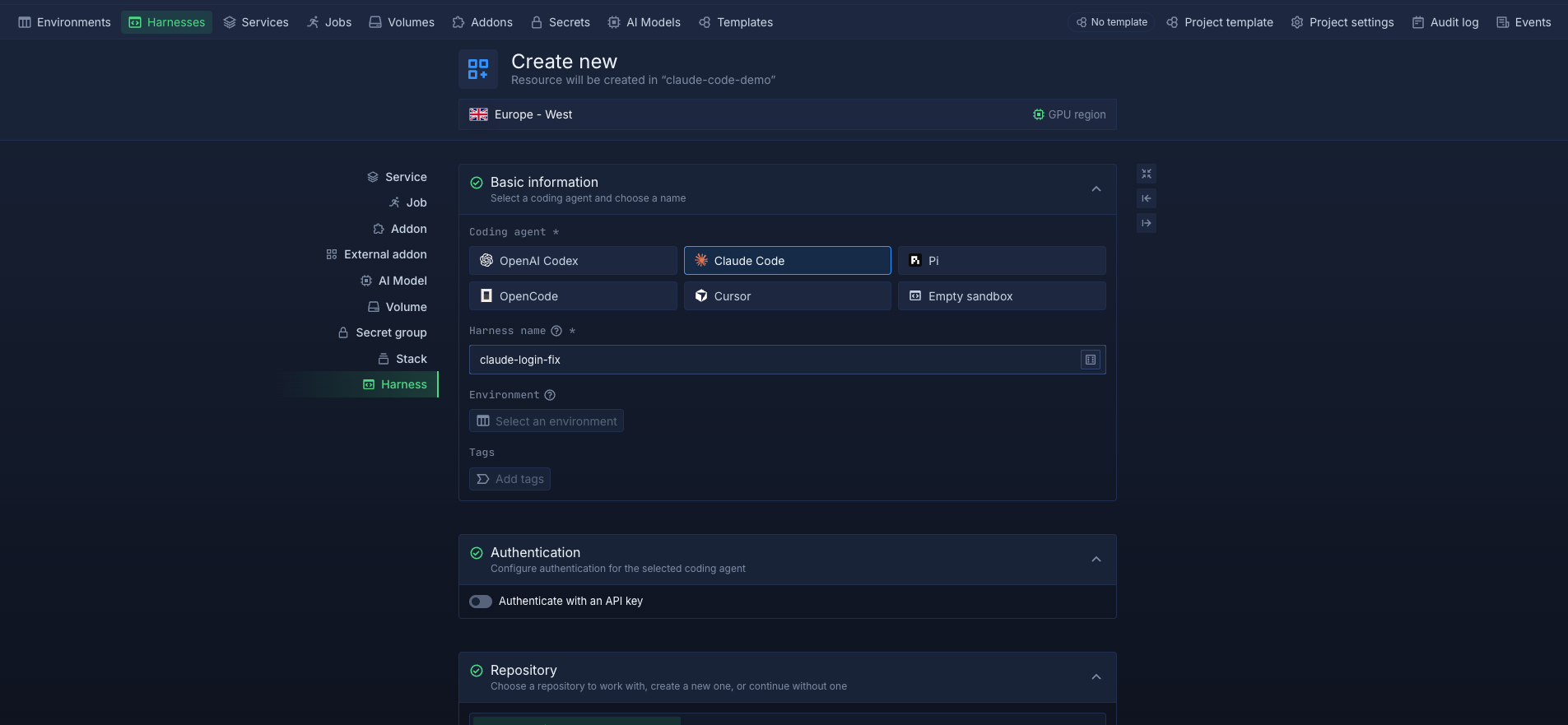
Harnesses run on Northflank's managed cloud or in your own AWS, GCP, Azure, Oracle, or CoreWeave account through self-serve BYOC. Each Harness runs in an isolated microVM environment, giving teams control over where their coding environments run while keeping the workspace separate from other workloads and the host infrastructure.
You can create a Harness from the Northflank dashboard, connect to it remotely through SSH, and run a coding agent in the same way you would locally. The workspace persists between sessions, so you can disconnect and return to the same environment without losing your files, dependencies, or Git history.
Run a coding agent in an isolated cloud harness with Northflank Cloud Harnesses, or book a demo to discuss your team's setup.
No. A development environment is a general-purpose setup for writing and testing code, while a coding harness provides an environment specifically for coding agents, with isolation, access controls, credentials, and persistent workspace state.
A sandbox focuses on isolating code execution from the host system. A coding harness is broader, providing the workspace, repository access, credentials, persistence, and other infrastructure the coding agent needs to operate.
Yes. You can run multiple coding agents by creating separate harnesses for each agent or task. This keeps their workspaces and execution environments isolated from one another.
No. A coding agent can run directly on a local machine, but a coding harness provides additional isolation, persistence, access controls, and a dedicated workspace for the agent.
Any coding agent that can run in the harness environment can be used. Northflank Cloud Harnesses support Claude Code, Codex, Cursor, OpenCode, Pi, and bring your own agent.